> For the complete documentation index, see [llms.txt](https://community.threekit.com/llms.txt). Markdown versions of documentation pages are available by appending `.md` to page URLs; this page is available as [Markdown](https://community.threekit.com/platform-documentation/catalog-2.0-docs/project-data/logic/queries/asset-query.md).
# Asset Query
Query and fetch the most recent asset matching the given metadata key-value pairs
Asset Queries are available for **Set Attribute Value** and **Set Property** actions. With these actions we can perform a search through the current org's Asset Library, for specific assets that have a given set of metadata key-value pairs.
This functionality enables us to build automation with [Template Assets](/learn/workflows/template-assets.md), so that we can handle large sets of configurable 3D models and materials at scale. These setups typically work in conjunction with [Metadata Value Queries](/platform-documentation/catalog-2.0-docs/project-data/logic/queries/metadata-value-query.md).
{% hint style="info" %}
The query will always return ONLY ONE asset - the last updated asset that matches the metadata provided, and of the type required by the action.
For example: a **Set Attribute Value** action on an attribute of type a**sset-texture** will only search for texture assets.
{% endhint %}
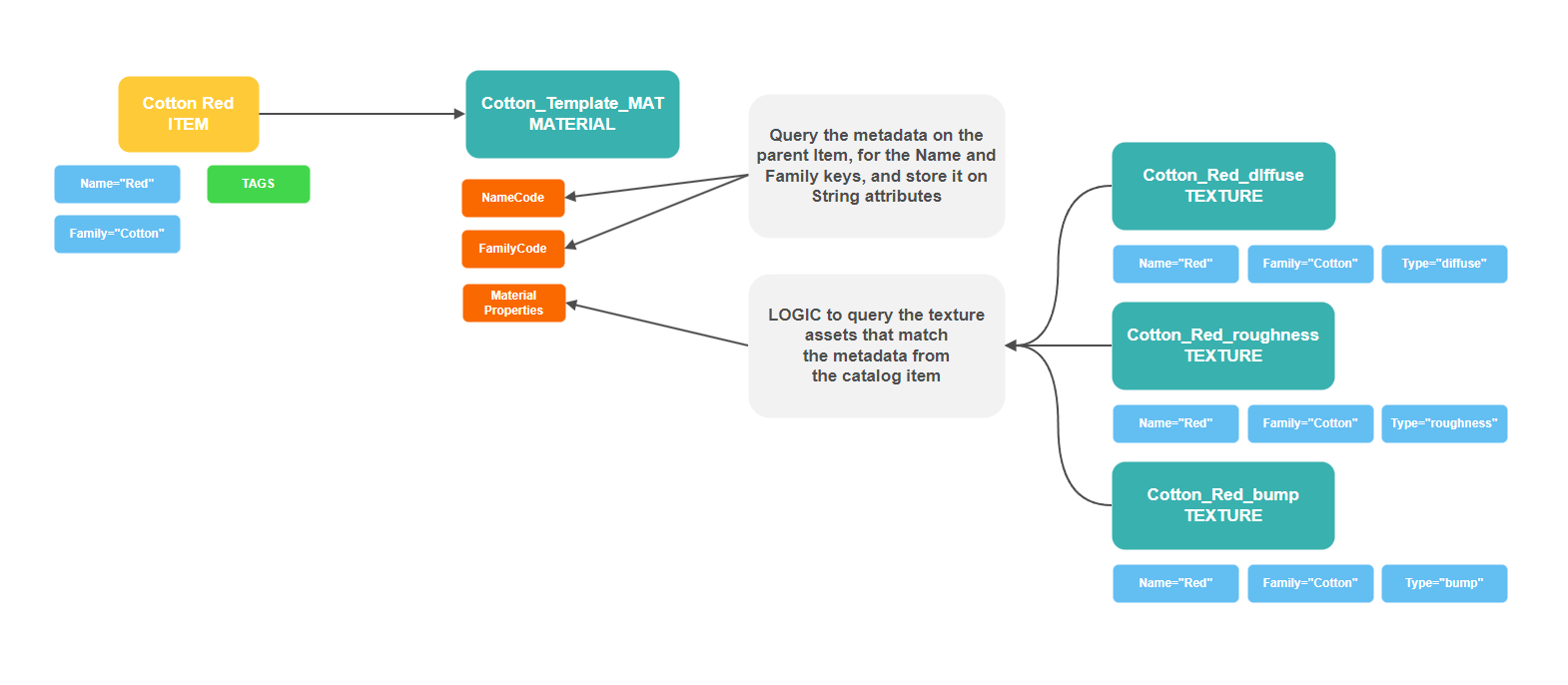
Let's take a look at an example of a [Template Material](/learn/workflows/template-assets.md#advanced-setup), where we are trying to populate three material properties with custom maps for the Cotton Red material option.
In this scenario, the catalog item has two metadata fields on it - **Name** and **Family**.
The texture assets also have the same metadata fields on them, generated perhaps using the [Apply Metadata Pattern tool](/tools/general-apps/apply-metadata-pattern.md).
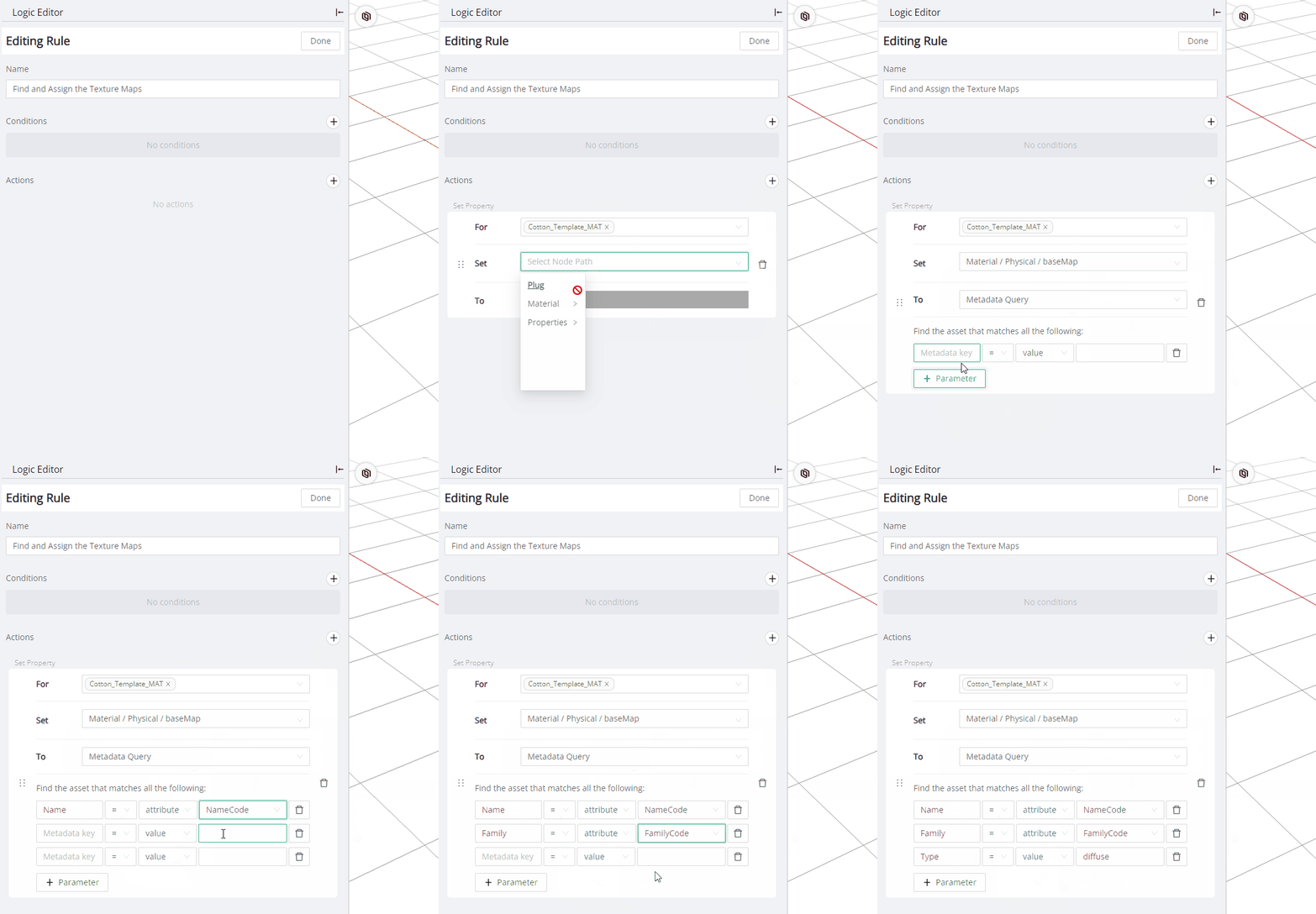
We can then use the **Asset Query** option for the **Set Property** action inside the Template Material, in order to find the three texture assets and assign them automatically.
Loading Textures automatically into a Template Material
Using an Asset Query with the Set Property action
{% hint style="info" %}
Take note that the Asset Query is currently labelled **Metadata Query** in the ThreeKit UI
{% endhint %}
The usage of the Asset Query with a **Set Attribute Value** action is exactly the same as shown above. The option is only available on attributes of type **asset**.
---
# Agent Instructions
This documentation is published with GitBook. GitBook is the documentation platform designed so that both humans and AI agents can read, navigate, and reason over technical content effectively. Learn more at gitbook.com.
## Querying This Documentation
If you need additional information that is not directly available in this page, you can query the documentation dynamically by asking a question.
Perform an HTTP GET request on the current page URL with the `ask` query parameter, and the optional `goal` query parameter:
```
GET https://community.threekit.com/platform-documentation/catalog-2.0-docs/project-data/logic/queries/asset-query.md?ask=&goal=
```
`ask` is the immediate question: it should be specific, self-contained, and written in natural language.
`goal` is optional and describes the broader end goal you are ultimately trying to accomplish on behalf of the user. GitBook uses it to tailor the answer towards what is most useful for that goal.
The response will contain a direct answer to the question and relevant excerpts and sources from the documentation.
Use this mechanism when the answer is not explicitly present in the current page, you need clarification or additional context, or you want to retrieve related documentation sections.